Jump to a section
THE DECISION IN BRIEF
Which workflow fits you?
Flex changes the reading and touch interface, and has a documented routine Bluetooth update path. Nano X is a compact button-based alternative. Compare the screen need, app requirements and full purchase package.
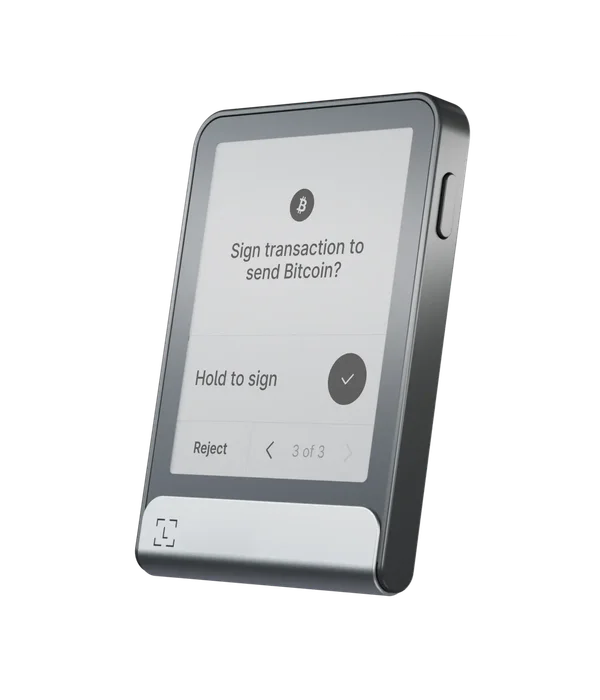
Ledger Flex
Investigate Flex if its E Ink touchscreen solves a reading or navigation need in your own workflow.
Before you choose: Check current app OS requirements and the desktop fallback for stuck Update Mode; a bigger screen is not a universal compatibility upgrade.
Read the full profile ↗Check the official store ↗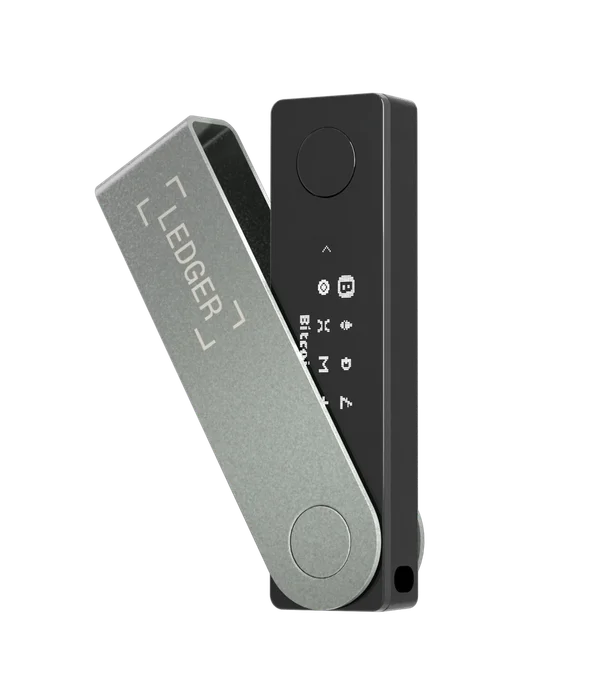
Ledger Nano X
Investigate Nano X if its smaller screen and physical controls suit you and you have resolved the update condition.
Before you choose: Do not assume Flex accessories or model-specific app integrations transfer to Nano X.
Read the full profile ↗Check the official store ↗Official store links are direct and non-affiliate. Check current price, shipping and package contents with the seller. This is a documentation comparison, not a hands-on ranking.
The differences, side by side.
| Requirement | Ledger Flex | Ledger Nano X |
|---|---|---|
| iPhone signing | Bluetooth | Bluetooth |
| Android signing | Bluetooth / USB-C | Bluetooth / USB-C |
| Transaction screen | 2.84-inch E Ink touchscreen | Dedicated monochrome display |
| Phone application | Ledger Wallet | Ledger Wallet |
| Routine maintenance | Bluetooth updates documented for Flex. Failed-update recovery may require a computer. | Bluetooth: Ledger OS 2.4.1+. Older OS: wired desktop or Android required. |
| Recovery to investigate | Enter a valid recovery phrase on the hardware device; account restoration and optional backups have their own requirements. | Keep a valid recovery phrase. Replacement-device recovery is documented by Ledger; not hands-on verified here. |
The screen is the clearest practical difference
Flex offers a touchscreen; Nano X uses a smaller display with physical buttons. Decide whether reading longer information and navigating with touch would improve your routine enough to justify a different size and cost.
A feature count cannot answer that. Look for a demonstration of an address check or transaction approval, then compare how much scrolling and interaction is involved. We have not measured either device’s speed or comfort.
Check the starting point, not just daily signing
Nano X Bluetooth OS updates require device OS 2.4.1 or later. An earlier installation needs a wired Android or desktop update first. For a buyer who has only an iPhone, the installed version is part of compatibility, not a small post-purchase detail.
Ledger documents Flex updates through Ledger Wallet on a phone over Bluetooth. Its troubleshooting still describes using desktop software when a device is stuck in Update Mode. That gives Flex a documented routine mobile update route, while leaving an exceptional computer dependency visible. Neither product should be sold here as a guarantee that every possible fault is repairable with only an iPhone.
Match third-party apps model by model
Identify the asset, network and mobile application you need. Ledger Wallet support and a third-party integration are different checks. A desktop extension demonstrating a Ledger connection does not establish the same model and feature on iPhone or Android.
Flex specifications list iOS 14+, while Ledger’s current phrase-recovery prerequisites list iOS 15+. Resolve that difference against the current app and intended task before purchase. Android 10+ is documented. A minimum listed on a product page should not substitute for confirming that the required app is available on your phone today.
Unpack the bundle carefully
The Flex product page checked for this comparison includes a Recovery Key. Check the exact package at checkout, because bundle contents can change. Do not assume that an accessory supported by Flex is interchangeable with the Nano X recovery arrangement.
Both devices have an on-device recovery-phrase workflow. Optional backup accessories and subscription services add their own requirements; they are not the same thing as ordinary Bluetooth signing. Compare shipping, taxes and the accessories you actually intend to use, rather than a bare device price against a fully loaded bundle.
Choose the interface you will use carefully
Nano X is worth investigating if compact hardware and physical buttons suit you. Flex is worth investigating if a touchscreen addresses a real reading or navigation need. Neither choice removes the responsibility to check transaction details.
If both pass your compatibility and recovery checklist, the remaining decision is about fit and cost. If one fails a required app or update step, eliminate it before arguing about which screen looks better.
Go to the source.
Sources for this guide checked 19 October 2026. Individual catalog profiles retain their own review dates. We have not hands-on tested these workflows.