Bitcoin-focused choice / PHONE BUYING GUIDE

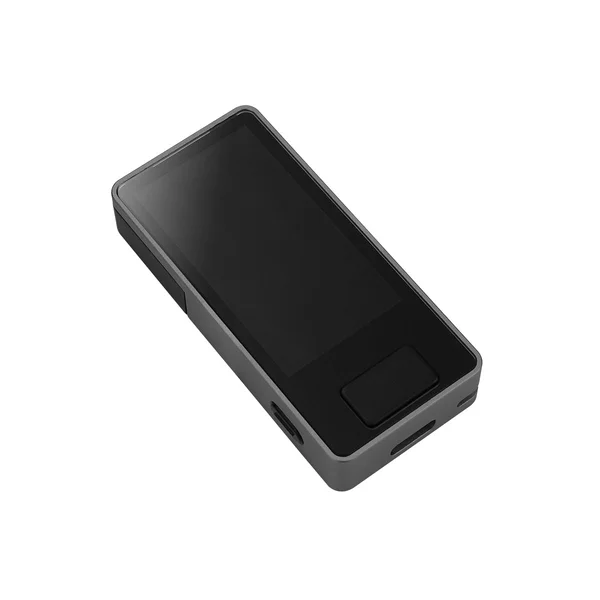
Blockstream Jade Plus

A relevant Bitcoin-focused option for phone users who understand the PIN-oracle model. Bluetooth offers a routine mobile path; QR has asset and workflow limits.

Official store · direct, non-affiliate link
Current price, shipping and availability are shown by the seller.

Blockstream Jade Plus09 / MANUFACTURER IMAGE
iPhone
Bluetooth / QR codes
Android
Bluetooth / USB-C / QR codes
Transaction review
1.9-inch colour screen and physical controls

A GOOD FIT IF

This could be your setup.

  • Your needs centre on Bitcoin or a documented Liquid workflow.
  • You want Bluetooth phone use with QR available for suitable Bitcoin transactions.
  • You understand how normal PIN unlocking depends on a companion app and oracle.

PAUSE BEFORE BUYING

Check these deal-breakers.

  • —You need general Ethereum or Solana transaction signing.
  • —You expect QR in Blockstream app to support Liquid assets.
  • —You require every unlock and maintenance scenario to avoid external services or accessories.
Companion app
Blockstream app; other compatible Bitcoin wallets
Phone requirements
iOS Bluetooth or Android Bluetooth/USB; verify current app-store OS requirements. QR needs camera access.
Asset scope
Bitcoin and supported Liquid workflows. No general Ethereum/Solana signing; QR in Blockstream app is Bitcoin-only.
The detail that can change your decision

Normal PIN unlocking uses a companion-mediated PIN oracle. QR mode in Blockstream app supports Bitcoin, not Liquid assets.

Complete the PIN setup, not just the phrase screen.

The setup guide creates or restores the phrase on Jade, then completes PIN setup with a companion application. Blockstream notes that the phrase is not saved on the device until that process is finished. A partial setup is therefore not the same as a ready wallet.

The connection guide distinguishes platforms: Bluetooth for iOS and Android, USB for Android and desktop. QR is another option with a supported app. For the normal iPhone route, plan Bluetooth and a charged device; do not assume a USB-C iPhone has the documented Android data path.

Bitcoin focus narrows the decision.

Jade Plus has a colour display, physical controls and a camera. In the Blockstream app, QR mode supports Bitcoin transactions; Liquid assets use USB or Bluetooth. This distinction matters more than a generic “supports QR” badge when you choose a network.

The companion-app directory lists several supported wallets, but their connection methods differ. Choose a specific app and workflow rather than combining a feature from one app with a connection from another. This is not a general-purpose replacement for an Ethereum or Solana hardware signing setup.

Mobile updates follow initial setup.

Blockstream documents firmware updates in its mobile app after initial setup is complete. Bluetooth availability matters: a no-radio firmware choice changes the connection options. The separate browser update portal uses a computer with WebSerial support.

Jade Plus also has an accessory-based air-gapped update route. Do not assume that selecting QR for transactions automatically completes that maintenance plan. Check the exact accessory, file-transfer and firmware instructions before relying on it. Our finder’s mobile-maintenance label describes the normal supported app route.

Understand what the PIN oracle does.

Normal PIN unlocking uses an encrypted exchange through the companion app with a PIN oracle, usually the Blockstream-operated service. The manufacturer documents alternatives such as running your own oracle or unlocking from recovery material. Those are different operational choices, not a reason to hide the normal service dependency.

Recovery instructions describe entering 12 or 24 words on Jade, or using its supported QR recovery route, and then connecting a compatible app. Preserve the correct backup, any passphrase and the relevant wallet policy. If you use a more complex multisignature arrangement, its recovery requirements need a separate review. We have not tested recovery or audited the oracle design.
BEFORE YOU DECIDE

The questions that matter.

Can Jade Plus work with an iPhone?

Yes, Blockstream documents Bluetooth phone use. QR is available for supported Bitcoin workflows; USB data is documented for Android and desktop.

Can I use it for Ethereum?

This shortlist entry is for Bitcoin and supported Liquid workflows, not general Ethereum or Solana signing.

Is PIN unlocking completely offline?

Normal PIN unlocking involves a companion-mediated PIN oracle. Alternative unlock methods have different requirements and should be planned separately.

READY FOR THE NEXT STEP?

Check the fit.
Then check the price.

Confirm your phone, asset network and backup method. Compare the full checkout total, including delivery, before ordering.

Check Jade Plus at Blockstream

Official manufacturer website.
No affiliate commission on this link.

Official evidence.

Manufacturer sources checked 19 October 2026. No independently selected owner reports or video review are included in this profile yet. Check the current requirements before a purchase.

How we select and interpret evidence →